Company Profile: A Stylish Solution for Professional Presentations
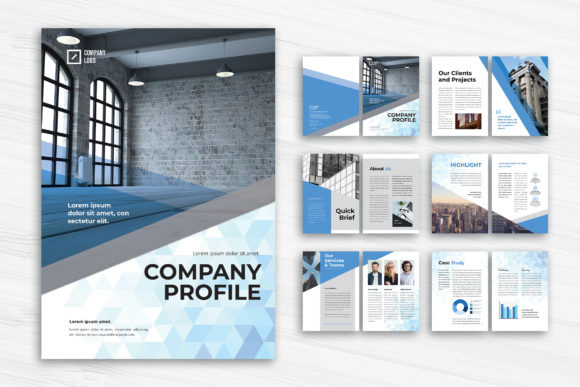
Creating a compelling company profile is essential for businesses aiming to communicate their value effectively. The Company Profile – Professional Companies InDesign template offers a sleek, customizable layout designed for A4 size documents. Whether you're a small business owner, a marketing professional, or a freelance designer, this template helps you present your company's story, services, and data through a blend of images, infographics, and text—all in a visually appealing format.
Why Choose This InDesign Template?
This 12-page layout includes a front and back cover, making it ideal for reports, portfolios, proposals, and more. Built with Adobe InDesign, the template allows for easy customization—adjust colors, fonts, and layout elements to match your brand identity. It supports both INDD and IDML formats, ensuring compatibility across different versions of InDesign. With a CMYK color profile and 300 DPI resolution, it's print-ready right out of the box.
Common Mistakes When Using Company Profile Templates
While this template offers many advantages, users often make a few key mistakes that can affect the final outcome. Understanding these pitfalls can help you avoid frustration and ensure your final document looks polished and professional.
1. Overlooking Image Licensing and Quality
One of the most common issues is using low-resolution or copyrighted images. The template includes preview images, but these are not part of the download package. Some users mistakenly assume they can use the sample images in their final document, which may lead to legal issues or poor print quality.
Better approach: Always source high-resolution images from royalty-free platforms or invest in professional photography. Ensure you have the appropriate licenses for commercial use, especially if the profile will be printed or shared publicly.
2. Ignoring Font Licensing and Availability
The template uses free fonts from DaFont or Google Fonts, which are great for accessibility and cost-effectiveness. However, some users change the fonts without verifying licensing or cross-platform compatibility, which can cause display inconsistencies across devices or printers.
Better approach: Stick to the recommended fonts or choose alternatives with clear licensing for both digital and print use. Always embed fonts when exporting to PDF to prevent typeface mismatches.
3. Underestimating the Importance of Bleed and Margins
Print-ready documents require a 3mm bleed to avoid white edges after trimming. Some users overlook this detail, especially if they're new to design software like InDesign, leading to unprofessional results.
Better approach: Make sure your background elements extend into the bleed area. Use the template’s built-in guides to maintain safe margins for text and key visuals, ensuring nothing important gets cut off during printing.
4. Poor Layer Organization and File Management
The template comes with neatly organized layers, but users sometimes ignore this structure when customizing. This can lead to confusion, especially when returning to the file after some time or when collaborating with others.
Better approach: Maintain the original layer structure and rename layers clearly. Group related elements and lock layers you're not actively editing to prevent accidental changes.
5. Not Proofreading or Testing Print Output
Even the most visually stunning profile can be ruined by typos or formatting issues. Some users skip proofreading or fail to test print their document before mass production.
Better approach: Always review your document for text errors, alignment issues, and color consistency. Print a test copy or use a PDF proofing tool to catch any last-minute issues before final printing.
What to Check Before Downloading or Customizing
Before you dive into customization, take a few moments to verify the following:
- Compatibility: Confirm whether your version of Adobe InDesign supports the INDD or IDML file included.
- Image and font sources: Ensure you have access to high-quality images and properly licensed fonts.
- Document settings: Double-check the color mode (CMYK for print), resolution (300 DPI), and bleed settings.
- Layer structure: Review the layer organization to understand how elements are grouped and named.
Maximizing the Value of Your Company Profile
Using the Company Profile – Professional Companies template is more than just filling in placeholders. It's about creating a cohesive narrative that reflects your brand's professionalism and values. Here are a few tips to get the most out of your template:
- Plan your content first: Outline your sections—introduction, services, team, testimonials, contact—before designing.
- Balance visuals and text: Use infographics to simplify complex data and avoid overcrowding pages with dense text.
- Customize thoughtfully: Adjust colors and layouts to align with your brand identity without straying too far from the template’s structure.
- Export correctly: Save your final document as a PDF with embedded fonts and high-quality image compression.
Conclusion: A Template Worth Investing In
The Company Profile – Professional Companies InDesign template is a versatile and elegant choice for anyone looking to create a polished, print-ready document. By avoiding common mistakes and understanding how to customize it effectively, you can ensure your company profile stands out for all the right reasons. Whether you're pitching to investors, presenting to clients, or sharing your story with partners, this template gives you the tools to communicate with clarity and style.